Rust Inspired ox-inventory
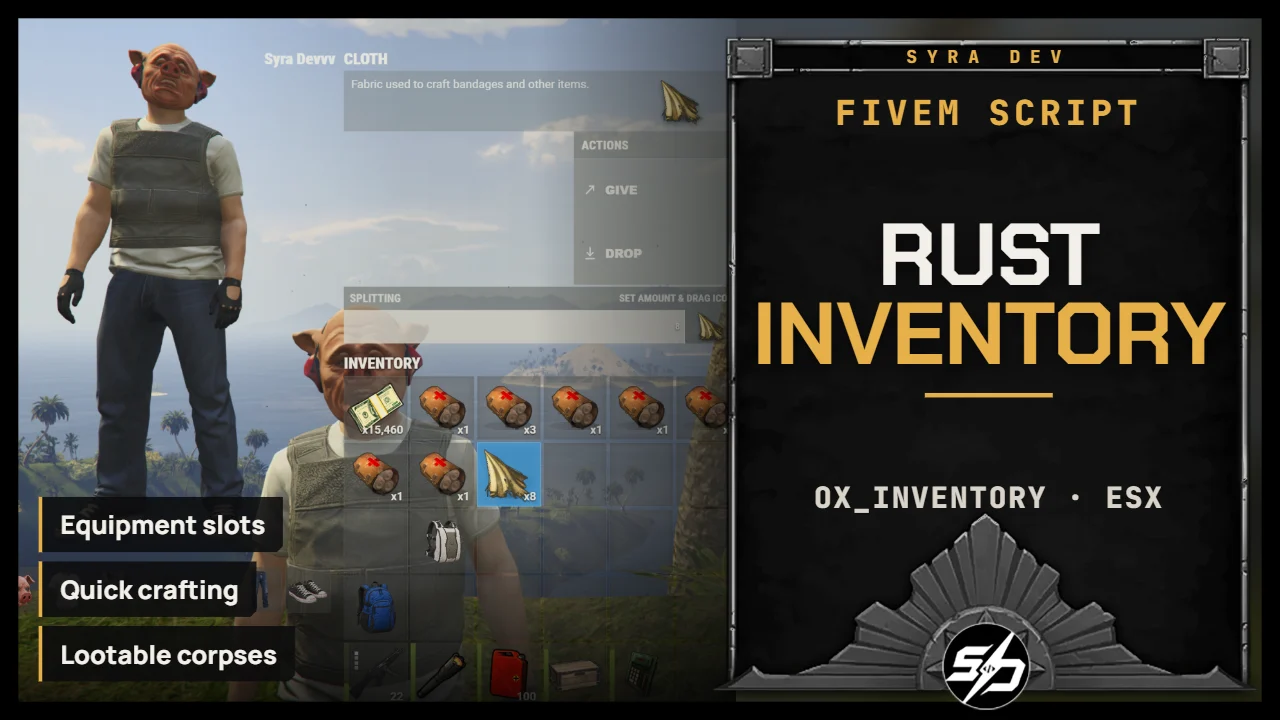
Syra Inventory — Rust-Inspired Inventory
Bring a Rust-inspired inventory experience to your FiveM server.
Syra Inventory is a customized ox_inventory resource designed for survival and PvP gameplay. It combines a dedicated interface, character preview, equipment slots, weapon attachments, backpacks, quick crafting and death loot management.
Players can organize their equipment through drag and drop, manage their weapons and transfer loot quickly. Server owners can configure items, stack limits, crafting recipes, backpack capacities and interaction settings.
Key Features
-
🎒 Rust-inspired interface: Dedicated inventory layout with item descriptions, equipment slots, storage panels and character preview.
-
⌨️ Six-slot hotbar: Access your equipped items quickly, with ammunition counts, item quantities, durability bars and weapon attachment indicators. You can chose to have it display all the time or not.
-
🖱️ Rust inspired feeling : If you love the feeling of Rust inventory, you will have the same feeling here, things are working almost the same... but better !
-
⚡ Quick transfers: Hold a configurable key and hover over items to transfer them between your inventory and nearby storage.
-
👕 Equipment slots: Free slots for headwear, masks, torso clothing, armour, gloves, trousers, footwear and backpacks.
-
🔫 Weapon attachments: Inspect weapons and add compatible accessories through attachment slots or by dropping an accessory directly onto a weapon.
-
🧳 Backpack storage: Configurable backpack capacities with contents preserved when the backpack is transferred or picked up.
-
🛠️ Quick crafting: Configurable recipes, quantities and crafting times, with a production queue. Materials are consumed when each craft starts and refunded if it is cancelled.
-
💀 Lootable corpses: A separate body keeps the player’s loot after death, including after respawn or disconnection. After a configurable delay—15 minutes by default—the remaining loot becomes a ground bag.
-
📍 Object placement: Place configured items in the world, adjust their rotation, and recover or destroy placed objects.
-
📋 Discord logs: Separate webhook destinations for deaths, items taken from death loot and transfers between players.
-
🎛️ Configurable gameplay: Adjust stack sizes, recipes, equipment definitions and which items can be used directly from the inventory.
Technical Information
- Code is accessible: Partially (config files and UI)
- Subscription-based: No
- Lines (approximately): 21,300
- Framework: ESX
- Inventory base: ox_inventory
- Requirements: ox_lib, oxmysql and ESX
- Target interactions: ox_target, with a configurable marker alternative for death loot
- Interface languages: English and French
- Support: Yes
Please note: Death bodies and ground loot survive player disconnections, but do not persist through an inventory resource or server restart.
Installation guide
Back up your current inventory
Back up your existing
ox_inventoryresource and your saved inventories before replacing an existing installation. The supplied item catalog is a reduced starter set, and there is no automatic item or database migration: add every item name already used by your other scripts or saved inventories before going live.Download the resource
After purchase, sign in to portal.cfx.re (Granted Assets) with the Cfx account linked to your Tebex order and download
ox_inventory.Install the folder
Extract the folder as
resources/[your-folder]/ox_inventory. Do not run two resources namedox_inventory.Install the dependencies
Install
ox_lib,oxmysql, your framework and its SQL schema. The default framework is ESX; ESX status effects also need your usual status integration. Adapters for ox, ND and Qbox are included, but plainqb-corecompatibility is not promised.Start order in server.cfg
Start the dependencies before the inventory:
setr inventory:framework "esx" setr ox:locale "en" ensure oxmysql ensure ox_lib ensure es_extended ensure ox_target ensure ox_inventoryox_targetis optional. Without it, setRustConfig.DeathLoot.InteractionMode = 'marker'inshared/config.lua.Add your own items
Add the labels to
locales/en.luaandlocales/fr.lua, then declare the item indata/items.lua:my_drink = { label = T('rust_item_my_drink_label'), description = T('rust_item_my_drink_description'), weight = 500, stack = true, close = false, AutorizeUseFromInventory = true, client = { image = 'my_drink.png', status = { thirst = 200000 }, usetime = 2000, }, },Put the icon in
web/images. The spellingAutorizeUseFromInventoryis intentional. Restart the resource to load item, locale or config changes; rebuilding the web UI is not needed.Optional: Discord logs
Death, loot and give logs are sent to Discord webhooks defined with server only convars in your own configuration. Never use
setrfor these values or place them in shared Lua or NUI files.set inventory:deathWebhook "YOUR_DEATH_CHANNEL_WEBHOOK_URL" set inventory:deathWebhookSecondary "OPTIONAL_SECOND_DEATH_CHANNEL_WEBHOOK_URL" set inventory:deathLootWebhook "YOUR_LOOT_CHANNEL_WEBHOOK_URL" set inventory:giveWebhook "YOUR_GIVE_CHANNEL_WEBHOOK_URL"