Character Store (Clothing, Barber, Tattoo) - ITEM VERSION
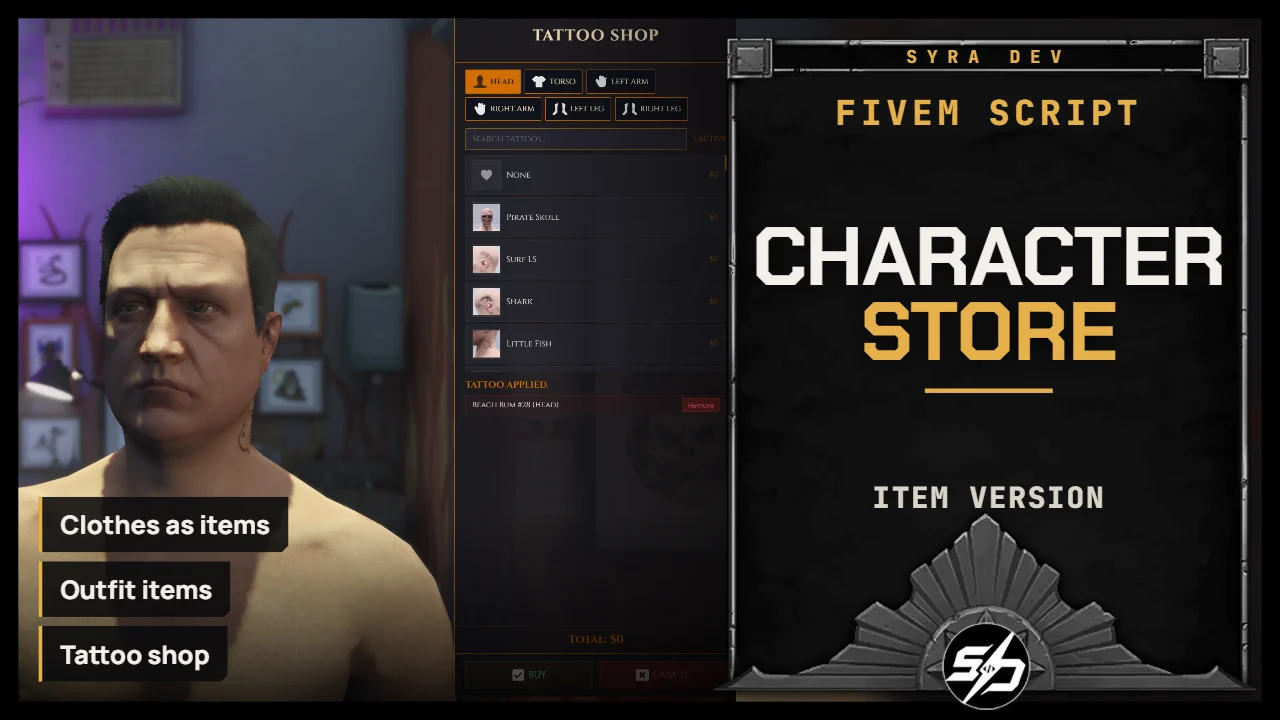
Syra Character Store is a full NUI shop system for clothing stores, barber shops, tattoo shops with a wardrobe system
It allows players to buy appearance changes as items, share outfits with other players and keep their character style persistent across sessions.
The script is designed as a complete appearance shop solution, with configurable locations, prices, categories, blocked clothing and payment methods.
Key Features
- 👔Clothing stores: Players can buy clothing through a modern NUI interface.

- 💈 Barber shops: Hair, beard, makeup and face-related style categories are supported.

- 🖋️ Tattoo shops: You can apply as many tattoos as you want and remove them easily.

-
🧥 Item system: Every clothe and barber articles are now in items (barber can be disabled)
-
🎒 Outfits: Player can also create a full outfit item in a wardrobe. A full look change in seconds


- 💰 Configurable prices and Blacklist: Every clothing, barber and tattoo category has its own configurable price. You can also blacklist some clothing.

- 🎛️ Highly configurable UI: Colors, fonts, locale, notifications, categories and behavior can be adjusted.

- 🧍And also : Come with a script to fix the hair ruining some masks look.

Technical Information
-
Framework : ESX, QB, Standalone
-
Code is accessible : No (Partially)
-
Subscription-based : No
-
Lines : 9400
-
Requirements : oxmysql, inventory system
-
Support : Yes
-
Locales : EN, FR
Installation guide
Download the resource
After purchase, sign in to portal.cfx.re (Granted Assets) with the Cfx account linked to your Tebex order and download
Syra_CharacterStoresItems.Add it to your resources
Extract the archive and place
Syra_CharacterStoresItemsin your serverresourcesfolder.SQL
syra_outfitsand thetattoosandskincolumns are created automatically on first start. Manual import:-- ESX source sql_esx.sql -- QBCore source sql_qb.sqlOn QBCore,
sql_qb.sqlincludesplayerskinsandplayer_outfits; theqb-clothingSQL is not needed.Add the items to ox_inventory
Metadata support is required for unique items. Add this to
ox_inventory/data/items.lua:['syra_outfit'] = { label = 'Outfit', weight = 100, stack = false, close = true, consume = 0 }, ['syra_tshirt'] = { label = 'T-Shirt', weight = 50, stack = false, close = true, consume = 0 }, ['syra_torso'] = { label = 'Torso', weight = 50, stack = false, close = true, consume = 0 }, ['syra_decals'] = { label = 'Decals', weight = 50, stack = false, close = true, consume = 0 }, ['syra_arms'] = { label = 'Arms', weight = 50, stack = false, close = true, consume = 0 }, ['syra_pants'] = { label = 'Pants', weight = 50, stack = false, close = true, consume = 0 }, ['syra_shoes'] = { label = 'Shoes', weight = 50, stack = false, close = true, consume = 0 }, ['syra_mask'] = { label = 'Mask', weight = 50, stack = false, close = true, consume = 0 }, ['syra_bproof'] = { label = 'Bulletproof Vest', weight = 50, stack = false, close = true, consume = 0 }, ['syra_chain'] = { label = 'Chain', weight = 50, stack = false, close = true, consume = 0 }, ['syra_helmet'] = { label = 'Hat', weight = 50, stack = false, close = true, consume = 0 }, ['syra_glasses'] = { label = 'Glasses', weight = 50, stack = false, close = true, consume = 0 }, ['syra_watches'] = { label = 'Watch', weight = 50, stack = false, close = true, consume = 0 }, ['syra_bracelets'] = { label = 'Bracelet', weight = 50, stack = false, close = true, consume = 0 }, ['syra_bags'] = { label = 'Bag', weight = 50, stack = false, close = true, consume = 0 }, ['syra_ears'] = { label = 'Earrings', weight = 50, stack = false, close = true, consume = 0 }, ['syra_hair'] = { label = 'Haircut', weight = 50, stack = false, close = true, consume = 0 }, ['syra_beard'] = { label = 'Beard', weight = 50, stack = false, close = true, consume = 0 }, ['syra_eyebrows'] = { label = 'Eyebrows', weight = 50, stack = false, close = true, consume = 0 }, ['syra_chesthair'] = { label = 'Chest Hair', weight = 50, stack = false, close = true, consume = 0 }, ['syra_makeup'] = { label = 'Makeup', weight = 50, stack = false, close = true, consume = 0 }, ['syra_lipstick'] = { label = 'Lipstick', weight = 50, stack = false, close = true, consume = 0 }, ['syra_blush'] = { label = 'Blush', weight = 50, stack = false, close = true, consume = 0 },Copy the icons from
img/*.pngintoox_inventory/web/images. Item blocks for qb-inventory, qs-inventory and an ESXitemsSQL insert are in the README.Start order in server.cfg
On QBCore, do not run the original
qb-clothingand start this resource beforeensure [qb]: it providesqb-clothing.ensure oxmysql ensure es_extended # or qb-core ensure esx_skin # ESX only; QB can use Syra without qb-clothing ensure ox_inventory # or your inventory ensure Syra_CharacterStoresItems # QB: start before ensure [qb], it provides qb-clothingConfigure
Config.Framework = 'auto_detect' -- 'auto_detect' | 'esx' | 'qb' | 'standalone'
Config.Locale = 'en' -- 'en' | 'fr'
Config.NotifySystem = 'syra' -- 'syra' | 'ox' | 'esx' | 'qb' | 'native' | 'custom' | 'none'
Config.UseOxTarget = false -- true = ox_target interaction zones
Config.Inventory = 'auto_detect' -- 'auto_detect' | 'ox_inventory' | 'qs-inventory' | 'qb-inventory' | 'qb_inventory' | 'esx_inventory'

Config.ItemPurchases = {
    clothing = true,
    barber = true,
    tattoo = false,
}